








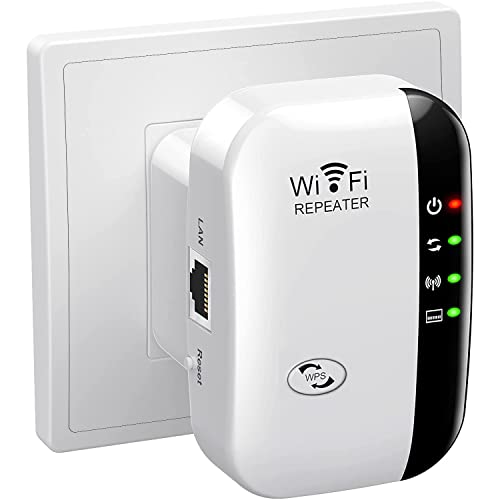
Understanding Wi-Fi Extenders: A Simple Introduction to Boosting Your Home Network
What is a Wi-Fi Extender?
A Wi-Fi extender is a device designed to amplify the range of your wireless internet signal. Imagine you have a large home, and your router is located in one corner. In some rooms far from the router, you may notice weak or no signal. A Wi-Fi extender helps eliminate these dead zones by capturing the existing signal from your router and rebroadcasting it, effectively doubling your internet coverage in your home.
Why Consider Using One?
If you find yourself frustrated by slow internet speeds or dropped connections in certain areas of your home, adding a Wi-Fi extender can be a game changer. Whether you’re streaming, gaming, or simply browsing, you can enjoy a reliable connection throughout your entire home. It’s an easy and effective solution for improving your online experience.
How Wi-Fi Extenders Work: A Clear Explanation with Everyday Examples
The Basics of Signal Boosting
Think of your Wi-Fi signal as a flashlight beam. When you shine a flashlight straight ahead, the light is bright and clear at close range, but weakens as it gets further away. Now, when you use a Wi-Fi extender, it’s like having an additional flashlight in the middle of the beam, which captures that fading light and extends it further into the darkness. This means you can reach those previously unreachable spots in your home, such as the far end of the attic or the basement.
Practical Example: Watching Movies
Imagine you decide to watch a movie on your tablet while lounging on your patio, but the video keeps buffering due to a weak connection. By placing a Wi-Fi extender partway between your router and the patio, you can catch and strengthen the Wi-Fi signal, allowing for uninterrupted streaming. It saves you the hassle of moving indoors or fiddling with connection settings.
Choosing the Right Wi-Fi Extender: Key Features We Should Look For
Speed and Compatibility
Look for a Wi-Fi extender that matches or exceeds the speed of your router. If your internet plan offers speeds up to 300 Mbps, choose an extender that supports at least that much. Additionally, check for compatibility—most extenders work with standard routers, but it’s wise to ensure the one you choose fits your specific setup.
Dual-Band vs. Single-Band Options
Expand your network capabilities by selecting a dual-band extender, which operates on both 2.4 GHz and 5 GHz frequencies. The 2.4 GHz band offers longer range but slower speeds, while the 5 GHz band provides faster speeds over shorter distances. This flexibility allows you to enjoy speedy connections in areas that require them, such as your home office.
Ease of Setup
Consider the user-friendliness of the extender. Many modern extenders come with smartphone apps for easy installation and management, while others simply plug in and use WPS for a hassle-free connection. We recommend looking for a setup that takes mere moments so you can start enjoying your Wi-Fi boost right away.
Setting Up Your Wi-Fi Extender: Step-by-Step Guide for a Seamless Connection
Placement is Key
To set up your Wi-Fi extender effectively, placement is crucial. Aim to position it about halfway between your router and the area where you want to enhance the signal. If you can place it in a location where it can still receive a strong signal from the router, this will ensure the best performance.
Connect and Configure
Once placed correctly, plug in the extender and turn it on. Many extenders will have a simple setup process, often involving connecting to the device using a computer or smartphone. Follow the prompts to connect it to your existing network—this usually just requires entering your Wi-Fi password.
Test Your Connection
After setup, it’s important to test the connection. Try accessing the internet in the areas you aimed to improve. If your speeds are satisfactory, then congratulations, you’ve successfully boosted your home network. If not, consider adjusting the extender’s placement slightly until you find the optimal spot.
Maximizing Your Wi-Fi Range: Tips and Tricks for Optimal Performance
Regular Updates
To keep your Wi-Fi extender working its best, regularly check for firmware updates. Many extenders have an easy-to-use admin interface that allows you to check and install updates to ensure you’re equipped with the latest performance enhancements.
Minimize Interference
Wi-Fi performance can be impacted by physical barriers like walls and appliances. Keep your extender away from potential interference, such as microwaves or cordless phones, which can disrupt the signal. A clear line of sight often yields the best results.
Consider Mesh System Alternatives
If your home is particularly large or has multiple floors, consider a mesh Wi-Fi system instead of a standard extender. Mesh systems use multiple devices to cover larger areas and can provide a more consistent signal throughout your home. Think about your networking needs and pick the best solution that fits your lifestyle.