

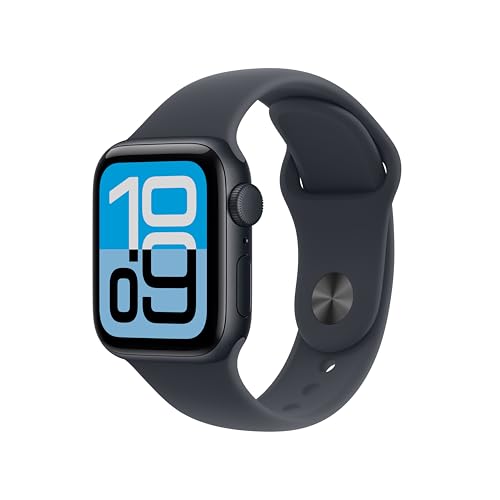
![Apple Watch SE (2nd Gen) [GPS 44mm] - Starlight Aluminum Case](https://m.media-amazon.com/images/I/41s2wuK+FdL._SL500_.jpg)

What is the Apple Watch and How Does It Work?
Understanding the Basics of Apple Watch
The Apple Watch is a smartwatch designed to seamlessly integrate into your daily life. It connects wirelessly to your iPhone, allowing you to receive notifications, answer calls, and send messages without needing to pull out your phone. Picture this: you’re in a meeting, and your phone buzzes with notifications—rather than fumbling to check, you simply glance at your wrist. The watch uses a combination of sensors and connectivity features, including Bluetooth and Wi-Fi, to keep you connected and informed throughout the day.
Core Functions of the Apple Watch
At its core, the Apple Watch tracks various health metrics, such as heart rate and physical activity, making it a valuable tool for fitness enthusiasts and health-conscious individuals alike. It features an array of applications that can monitor your workout sessions, remind you to stand up during long periods of sitting, and even alert you to irregular heart rhythms, enhancing both your wellness and daily motivation.
Key Features of the Apple Watch That Improve Your Daily Life
Health and Fitness Tracking
One of the standout features of the Apple Watch is its comprehensive health and fitness tracking capabilities. Whether you’re running, swimming, or doing yoga, the built-in workout app lets you choose from various activities to log your performance accurately. Imagine completing a challenging workout and instantly seeing how many calories you burned, your heart rate during the exercise, and how your performance compares to previous sessions.
Customization and Personalization
The Apple Watch also allows for a high degree of customization. You can choose different bands and watch faces to match your personal style or even the occasion. Want it to look sporty for your workout? Opt for a silicone band. Heading into a business meeting? Switch to a leather strap that complements your outfit. This feature means you’re not just wearing a smartwatch; you’re wearing a piece of technology that reflects who you are.
Seamless Notification Management
Another way the Apple Watch enhances our daily lives is through its notification management. With customizable settings, you can prioritize which notifications you want to see, allowing you to stay focused on what matters most. For example, during a busy workday, you can choose to only receive alerts from your calendar and email, while silencing social media notifications to minimize distractions.
Choosing the Right Apple Watch Model for Your Lifestyle
Assess Your Needs and Activities
When it comes to selecting the right Apple Watch model, consider your lifestyle and how you intend to use the watch. If you’re an avid runner, the Apple Watch Series with built-in GPS tracking might be ideal, offering more real-time data on your workout without needing your phone. On the other hand, if you primarily want a device for notifications and casual health tracking, the more lightweight Apple Watch SE may be sufficient.
Budget and Features Balance
Next, think about your budget. Apple offers several models at various price points, each with unique features catered to different users. The latest series typically comes packed with advanced health features and faster processors, while older models may provide all the necessary functionalities at a lower price. This balance helps you assess which model fits your needs without overspending.
Maximizing the Apple Watch: Tips and Tricks for Everyday Use
Setting Up Custom Alerts and Reminders
To get the most out of your Apple Watch, we recommend setting up custom alerts and reminders. Using the Reminders app, you can dictate when and why you want to be notified. For instance, setting a reminder to stand up every hour or receiving an alert when it’s time to take your medication can help improve your productivity and health.
Utilizing Siri and Voice Commands
Make the most of Siri on your Apple Watch by utilizing voice commands for quick replies or setting timers during workouts. Simply raise your wrist and say, ‘Hey Siri, reply to my last message,’ and the watch will transcribe your voice into a reply. This hands-free capability enhances convenience, especially when your hands are busy.
Understanding the Apple Watch Ecosystem and Compatibility with Other Devices
Compatibility with Apple Devices
The Apple Watch is designed to work seamlessly with other Apple devices such as your iPhone, iPad, and Mac. It enables functionalities like unlocking your Mac when you’re nearby or using your iPhone to locate the watch if you misplace it. By being part of the Apple ecosystem, the Apple Watch becomes an integral component of your digital lifestyle, making day-to-day interactions smoother and more efficient.
Third-Party App Integration
Moreover, the Apple Watch supports a range of third-party applications, enhancing its utility beyond basic functions. From fitness apps that count your steps to music streaming services that let you control playback directly from your wrist, the possibilities are vast. Imagine being able to skip tracks during a workout or track your meals—all through apps designed specifically for your watch.