



Understanding the Apple iPad: The Perfect Blend of Design and Functionality
Design That Captivates
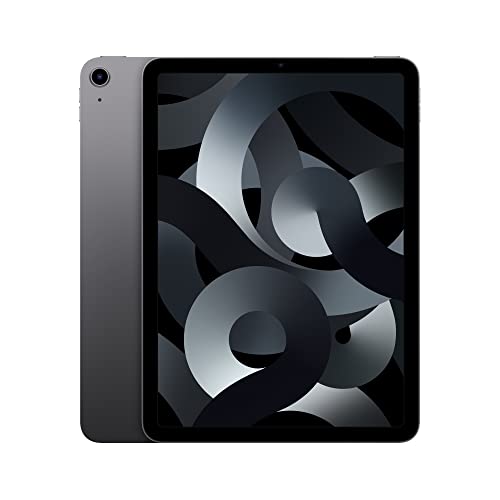
The Apple iPad stands out with its sleek and minimalist design. It feels solid in your hands, and the lightweight build ensures that you won’t feel weighed down when carrying it around. Whether you’re watching movies, reading books, or browsing the web, the Retina display brings your content to life with sharp colors and deep contrasts, ensuring an immersive experience.
Powerful Performance
Under the hood, the iPad packs impressive hardware, which translates to smooth multitasking and seamless app performance. Tasks like streaming video, playing games, and managing productivity apps run without hitches, so you won’t experience the frustrating lag that can happen with less powerful devices. Whether you’re in the office, at school, or lounging at home, the iPad adapts to your needs.
Choosing the Right Model: Which iPad Fits Your Needs?
Evaluate Your Usage
Start by identifying how you plan to use your iPad. If you’re mostly consuming media, such as watching movies or browsing social media, even the base model will serve you well. However, if you’re into creative tasks like graphic design or video editing, consider the more advanced models equipped with better processors and features like the Apple Pencil support. Think about screen size too; a larger display is great for productivity, while a smaller size enhances portability.
Budget Considerations
Determine your budget. Apple offers a range of prices across different models, so finding one that fits your financial plan is straightforward. The entry-level iPad is quite affordable and still offers great performance, while the Pro models are a bigger investment, perfect for professionals who need advanced features. Remember to factor in storage capacity as well—more storage allows for more apps and content.
Essential Accessories: Enhance Your iPad Experience
Must-Have Additions
To truly elevate your iPad experience, consider getting some key accessories. A protective case is essential to keep your device safe from drops and scratches while you’re on the go. If you plan to use your iPad for drawing or taking notes, the Apple Pencil is a fantastic tool that elevates the functionality of your iPad. Don’t forget about a keyboard—whether a Bluetooth keyboard or Apple’s Smart Keyboard, typing on an iPad can be transformed into a more comfortable experience.
Audio and Connectivity
Enhancing your audio experience is simple with wireless headphones or speakers that pair effortlessly with your iPad. Good audio is crucial for enjoying music, podcasts, or video content. Also consider external drives or cloud storage solutions to expand your device’s storage capabilities and keep your files accessible and organized.
Maximizing Battery Life: Tips for All-Day Usage
Simple Adjustments
To get the most out of your iPad’s battery, make some easy adjustments. Lowering the screen brightness and turning off location services when not in use can lead to significant power savings. Additionally, utilizing the ‘Low Power Mode’ can help extend battery life when you notice the charge dwindling.
App Management
Monitor your app usage. Some apps can drain your battery faster than others—keep an eye on this in the settings. Closing apps that you’re not using or limiting background app refresh can greatly enhance the longevity of your device throughout the day.
Getting Started: Setting Up Your New iPad Like a Pro
Setup Made Easy
Once you unpack your iPad, the setup process is straightforward. Follow the on-screen prompts to connect to Wi-Fi, set up your Apple ID, and customize your preferences. It’s user-friendly and quick, so you can start using your device in no time.
Personalization Options
Don’t forget to personalize your iPad to make it truly yours. Organize your apps into folders, choose a wallpaper that you love, and enable features that will optimize how you use your device. Whether it’s setting up FaceTime for video calls or downloading your favorite productivity apps, make the iPad work for your lifestyle.